

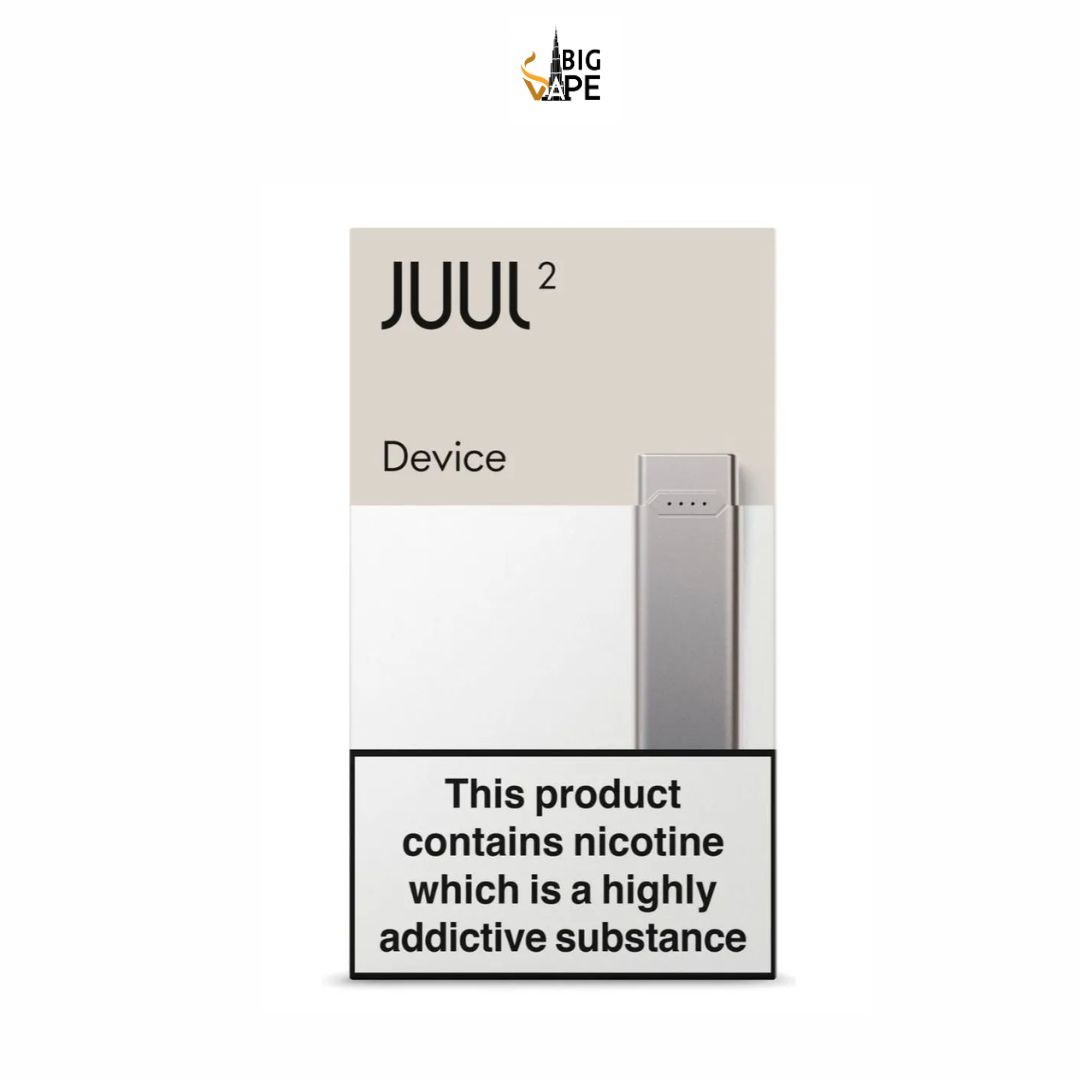
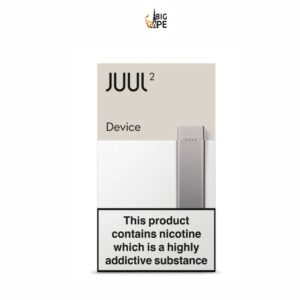
JUUL 2 Slate Grey Device
90.00 د.إ
- Color: Slate Grey (matte charcoal finish)
- Battery: 350 mAh
- Size: 87.2 mm × 15.1 mm × 7.2 mm
- Weight: ~14 g
- Charging: Magnetic USB dock
- Charge Time: ~60 minutes

JUUL 2 Slate Grey Device is a compact rechargeable pod device designed for use with JUUL 2 pods. It keeps the slim, simple form associated with the JUUL range while adding features such as a larger battery than the original JUUL, pod authentication, battery and pod indicators, Bluetooth connectivity, and a magnetic charging dock.
The Slate Grey finish gives the device a discreet matte appearance. Its draw-activated operation means there is no conventional firing button: once a compatible pod is inserted, the device activates when the user draws through the mouthpiece. Current product listings commonly identify the JUUL 2 device at around 70mm × 11mm × 7mm, with battery specifications varying between regional listings, including commonly reported capacities around 250mAh to 350mAh.
JUUL 2 Slate Grey Device Specifications
| Specification | Details |
|---|---|
| Product Name | JUUL 2 Slate Grey Device |
| Brand | JUUL |
| Color | Slate Grey |
| Finish | Matte / matte metallic |
| Product Type | Rechargeable Pod Device |
| Battery | Rechargeable built-in battery |
| Commonly Listed Capacity | Approximately 250–350mAh depending on regional listing |
| Charging System | Magnetic USB charging dock |
| Dimensions | Approximately 70mm × 11mm × 7mm |
| Activation | Draw-activated |
| Pod Compatibility | JUUL 2 Pods |
| Original JUUL Pod Compatibility | No |
| Third-Party Pod Compatibility | No |
| Indicator System | LED battery and pod indicators |
| Bluetooth | Yes, on supported configurations |
| Companion App | Available on supported devices/markets |
| Refillable Device | No |
| Built-In Coil | No; coil is integrated into compatible pod |
| Intended Users | Adults legally permitted to use nicotine products |
Slate Grey Design and Build
Matte Slate Grey Finish
The Slate Grey finish gives the JUUL 2 a muted grey appearance with a matte surface. Rather than using a bright or highly decorative design, the device keeps a simple rectangular shape.
This finish is particularly suited to buyers looking for a discreet-looking pod device.
Compact Dimensions
Current listings commonly place the JUUL 2 at approximately 70mm in length, 11mm in width, and 7mm in depth. One current product listing reports a weight of around 14 grams.
Its slim profile makes it easy to carry in a pocket or small bag.
Button-Free Operation
The JUUL 2 uses draw activation, so there is no traditional fire button on the body. The device automatically responds when the user draws through a properly installed pod.
This keeps the external design minimal and reduces the number of controls users have to manage.
JUUL 2 Battery
Rechargeable Battery
The JUUL 2 contains a built-in rechargeable lithium-ion battery. Regional listings differ regarding the exact capacity, with current sources reporting values from approximately 250mAh through 350mAh.
For this reason, the packaging for the exact device is the best source for the battery specification.
Longer Battery Capacity Than Original JUUL
Product information for the JUUL 2 describes the battery as an increase over the original JUUL. Some current retailer information identifies approximately 328mAh, while other regional listings give different capacity figures.
Battery runtime depends on usage frequency, draw duration, pod type, and battery condition.
Magnetic Charging Dock
Simple Dock-Based Charging
The JUUL 2 uses a magnetic USB charging dock rather than a conventional USB-C socket directly on the device. The device attaches magnetically to the dock while the dock connects to a USB power source.
This means the charging dock is an important part of the JUUL 2 system and should be kept available for regular charging.
Charging Time
Current retailer specifications vary, but several listings indicate that the device can reach approximately 80% charge in around 30 minutes, while a complete charge can take around one hour depending on the version and charging conditions.
Actual charging time can vary according to the charger, battery level, battery condition, and regional device version.
JUUL 2 Pod Compatibility
Designed for JUUL 2 Pods
The Slate Grey device is designed specifically for JUUL 2 pods. Current product information states that JUUL 2 pods are physically different from original JUUL pods and are intended to work with the JUUL 2 device.
Original JUUL Pods Do Not Fit
Original JUUL pods should not be used with the JUUL 2. The two systems use different pod formats.
This is one of the most important points when purchasing a replacement device, especially for people who are familiar with the earlier JUUL platform.
No Third-Party Pod Support
Current product listings state that the JUUL 2 is designed to operate with authentic JUUL 2 pods rather than third-party cartridges.
JUUL 2 Pod Authentication
Encrypted PodID System
One of the distinguishing features of JUUL 2 is its pod-authentication system. Current product information describes an encrypted PodID chip built into genuine JUUL 2 pods.
The device reads the identification information before activating the pod. This provides a hardware-based compatibility check rather than relying only on physical fit.
Why Pod Compatibility Matters
Because the JUUL 2 relies on this identification system, purchasing a cartridge that merely looks physically similar does not necessarily mean it will function correctly.
Users should therefore choose genuine compatible JUUL 2 pods for the device.
LED Indicator System
The JUUL 2 does not use a conventional digital screen. Instead, it uses a series of LED indicators to communicate information.
Battery Indicator
Current product information describes a four-light battery system. Tapping the device twice can display the remaining battery level, with the lights representing different levels of charge.
This provides a quick way to check the device without opening an app.
Pod Indicator
The LED system can also provide information related to pod authentication and remaining liquid on supported JUUL 2 pods. Current UAE product information describes white flashes for pod verification and purple indicators for the approximate liquid level.
The precise indicator behavior can depend on the device and pod version.
Bluetooth and JUUL App
Bluetooth Connectivity
The JUUL 2 can pair with a compatible smartphone through Bluetooth on supported configurations.
The app is not required for basic operation. The device can be used with a compatible pod without relying on a smartphone connection.
Optional App Functions
Current product listings describe app-related functions such as checking usage information, monitoring battery information, remotely locking the device, and locating the last known device position on supported configurations.
Availability of these features can depend on the supported app, operating system, country, and current software configuration.
How to Use the JUUL 2 Slate Grey Device
Step 1: Charge the Device
Before first use, attach the device to its magnetic charging dock and connect the dock to an appropriate USB power source.
Step 2: Prepare a JUUL 2 Pod
Remove the compatible JUUL 2 pod from its packaging. Check that the cartridge is sealed and undamaged before inserting it.
Step 3: Insert the Pod
Insert the JUUL 2 pod into the top of the device. It should fit without requiring excessive force.
Step 4: Draw Through the Mouthpiece
The device is draw-activated, so no firing button needs to be pressed during normal use.
Step 5: Check the Indicator
The device’s LED system can provide battery and pod-related information. A tap on the device can display battery information on supported versions.
Step 6: Replace the Pod
When the pod is empty or its performance noticeably decreases, remove it and install a new compatible JUUL 2 pod.
The pod is not designed to be manually refilled.
Is the JUUL 2 Slate Grey Refillable?
No. The device itself is rechargeable, but the JUUL 2 system uses prefilled pods. The e-liquid is contained inside the pod rather than in a refillable tank.
Once a pod has been used, it should be replaced with another compatible pod rather than opened or filled with bottled e-liquid.
This distinction between rechargeable and refillable is important when comparing JUUL 2 with open-system pod devices.
JUUL 2 Slate Grey vs Original JUUL
Battery
The JUUL 2 was introduced with increased battery capacity compared with the original JUUL. Current retailer specifications identify the JUUL 2 in the approximate 250–350mAh range, while original JUUL listings commonly specify around 200mAh.
Pod Compatibility
The original JUUL uses original JUUL pods, while the JUUL 2 requires JUUL 2 pods.
Pod Authentication
The JUUL 2 includes a PodID authentication system that current product listings describe as an additional compatibility check.
Connectivity
JUUL 2 can offer Bluetooth and companion-app features on supported configurations, adding functionality that is not part of the basic original JUUL operating system.
Maintenance and Care
Keep the Device Dry
The JUUL 2 contains electronic components and a rechargeable lithium-ion battery. Keep the device and charging dock away from water and excessive moisture.
Keep the Charging Contacts Clean
The magnetic charging contacts should remain free from dirt and residue. If cleaning is necessary, use a suitable dry cleaning method and avoid introducing liquid into the device or dock.
Do Not Open the Device
The internal battery and electronics are not designed for user removal. Opening the housing can damage the device and create battery-safety risks.
Store It Safely
Keep the device and nicotine pods in a cool, dry place away from children and pets.
Buying Tips for JUUL 2 Slate Grey
Confirm It Is JUUL 2
The original JUUL and JUUL 2 are different generations. Verify the model before purchasing replacement hardware.
Check the Battery Specification
Current listings report different battery capacities for Slate Grey JUUL 2 devices. Check the box or regional specification sheet for the exact capacity of the unit you are purchasing.
Check Whether Pods Are Included
A standalone JUUL 2 Slate Grey device may come without pods. Current listings explicitly distinguish the device-only product from starter kits that include pods.
Confirm the Charging Dock
Because the JUUL 2 uses a magnetic charging dock, check whether the dock is included with your particular package.
Check Packaging and Condition
Purchase a properly sealed product and inspect the device for cracks, unusual swelling, liquid leakage, or other damage before use.
Frequently Asked Questions
What color is the JUUL 2 Slate Grey Device?
It has a muted Slate Grey finish, generally described as matte or matte metallic.
What battery does the JUUL 2 use?
It has a built-in rechargeable lithium-ion battery. Current retailer listings report different capacities, including approximately 250mAh, 328mAh, and 350mAh depending on the listing or regional version.
How does JUUL 2 charge?
The device charges through a magnetic USB charging dock.
Is the JUUL 2 draw activated?
Yes. The device is designed to activate when the user inhales through the pod, without requiring a conventional firing button.
Which pods work with the JUUL 2 Slate Grey?
The device is designed for JUUL 2 pods. Original JUUL pods and third-party pod formats are not intended for use with the device.
Can I use original JUUL pods with JUUL 2?
No. Original JUUL pods and JUUL 2 pods use different formats and are not interchangeable.
Does JUUL 2 have a screen?
No conventional digital screen is used. Instead, the device uses LED indicators to communicate battery and pod information.
Does the JUUL 2 connect to a phone?
Supported JUUL 2 configurations can connect to a companion app through Bluetooth. The app is optional for basic device operation.
Final Thoughts
The JUUL 2 Slate Grey Device is a compact rechargeable closed-pod system with a minimalist matte finish and simple draw-activated operation. Its main features include a built-in rechargeable battery, magnetic USB charging dock, LED status indicators, JUUL 2 pod authentication, and Bluetooth connectivity on supported configurations.
Its most important compatibility detail is that it is designed specifically for JUUL 2 pods. Original JUUL pods do not fit the JUUL 2, while the JUUL 2’s PodID system is designed to recognize compatible pods.
Related products
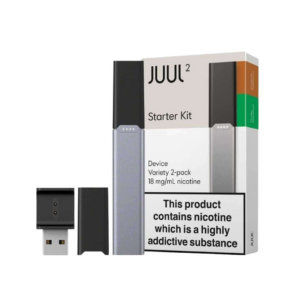
JUUL 2 Starter Kit Device
- Device: 1 x JUUL 2 Device
- Device Color: Slate Grey (matte charcoal finish)
- Pods Quantity: 2 pods (Virginia Tobacco & Crisp Menthol)
- Battery: 350 mAh (rechargeable)
- Activation: Draw-activated (just inhale)
- Size (Device + Pods): 97 mm × 15.1 mm × 72 mm
- Weight: ~14 g
- Charging: Magnetic USB dock
- Charge Time: ~60 minutes
Reviews
There are no reviews yet.